It Is Not a Productivity App. It Is a Prosthetic Prefrontal Cortex.
I posted a screenshot of the NeuroRythm dashboard on Facebook recently. Within minutes, the comments started rolling in. Graham and Debbie both looked at the interface and said the same thing: "Too many tabs."
They were not wrong to say it. They were looking through the framework of every productivity app they have ever abandoned. They saw a wall of information and their brains immediately went into a defensive crouch. That is not stupidity. That is the trauma of being trained by software that does not understand how our brains actually work.
Here is the reality. The ADHD brain has no filter. Everything hits at the same priority... the hum of the fridge, a project idea from three years ago, and the fact that your kid needs a library bag today. They all scream for attention at the exact same volume.
In a neurotypical brain, the prefrontal cortex acts as a gatekeeper. It filters the noise. Ours is permanently on a lunch break.
NeuroRythm is the external filter. It is a prosthetic prefrontal cortex. That is not marketing fluff. It is a mechanical statement of fact.
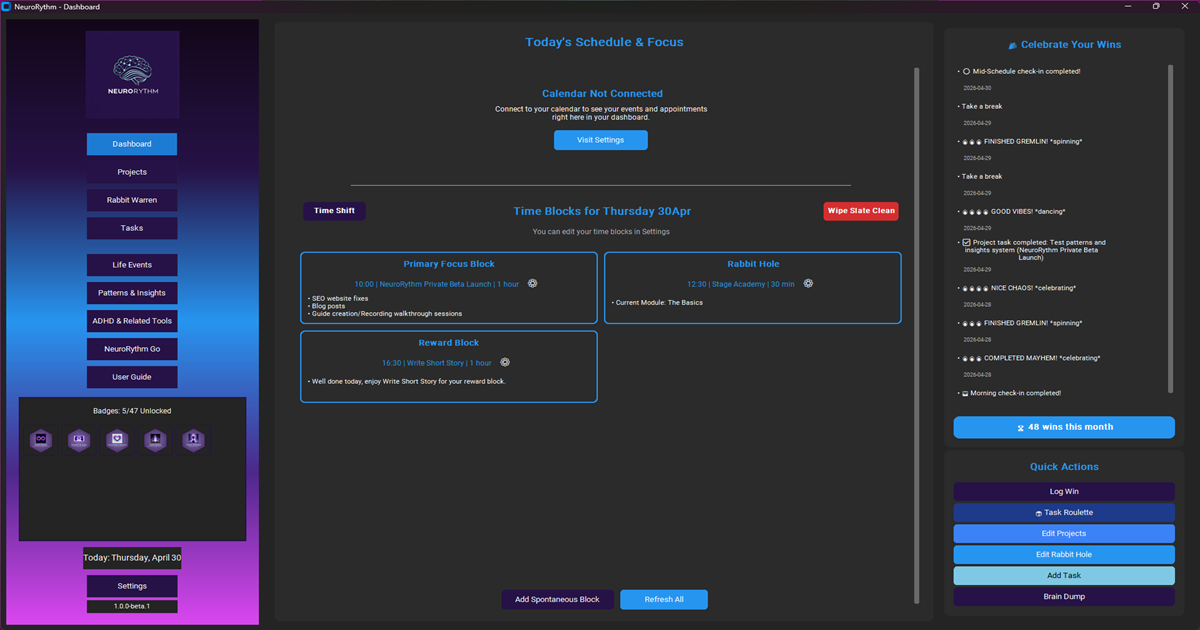 NeuroRythm Dashboard
How ADHD Productivity is Reclaimed After a Midland Panic
A few weeks ago, I was driving to an appointment with a welfare advocate in Midland. I left on time because the system reminded me. I was not rushing.
Halfway there, I hit that classic ADHD state of under-arousal. My mind started wandering. I was having imaginary conversations. I was walking into the office in my head. Suddenly... her name vanished. Total blank. I started to panic.
The old version of me would have spiralled into a sweaty mess. But because I was not late, I had the cognitive space to take a breath. I pulled over. I checked the email. I found the name. I walked into that office calm and prepared.
NeuroRythm did not just manage the appointment. It managed my identity. I walked in as a man who had his shit together because the system was holding my shit together for me.
With the coming webapp NeuroRythmGo to partner with NeuroRythm, I won't even need to check my email as the notes for the scheduled task will have the information there for me.
Context is the Key to Consistent Time Management
The ADHD brain struggles with contextual detail. You know you have to leave the house, but you forget the one thing that makes the trip worthwhile.
I set a recurring task for the school semester. Every Monday, thirty minutes before we leave, a reminder fires: "Library Day... library bag and book." On Tuesdays and Thursdays, it is the sports sneakers.
I set it once. I never have to think about it again. My brain gets the cue exactly when it is needed. It is not a panic search at the door. It is just... oh, there is the bag. The system holds the detail so my brain can stay empty.
I wrote more about why I built this system in my previous post: 663 Apps Couldn't Fix My ADHD Brain. So I Built NeuroRythm.
Wiping the Slate vs. Performing Failure
Life happens. I am a solo dad. Sometimes I plan two deep-work blocks on a Monday morning, but then an Amazon Flex shift pops up. Or my son gets sick and needs to stay home from school.
In any other app, those morning blocks would sit there staring at me all day. Red text. Overdue notices. Symbols of failure.
In NeuroRythm, I hit "Wipe Slate." I select the hours and the reason... Work, Child Sick, or just "Other" with a quick note. Those blocks never existed. My "Patterns and Insights" page records "Work" or "Parenting" instead of "Failure." The data stays honest because the system acknowledges reality. This is the core of real-world ADHD productivity.
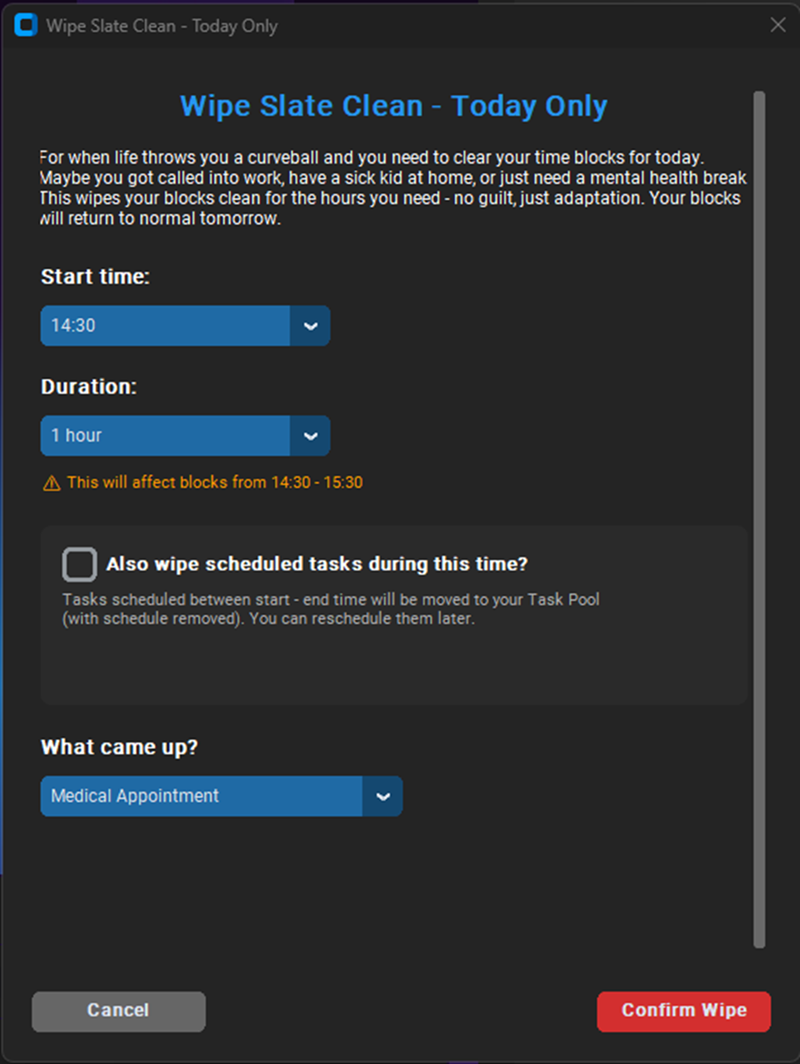
Wipe Slate Clean
Architecting the Subconscious for Better Focus
The most fascinating thing happened while I was still building the code. I had not even finished the system yet, but the architecture was already rewiring my behaviour.
I used to live in a "holy shit I am late" loop. I would sit there saying "five more minutes" until the clock ran out and the panic set in. That just... stopped.
After ten months of designing logistical buffers and "fail loud" logic, my subconscious started thinking in buffers instead of panic. I did not become a different person. I just finally had a filter that worked. If you want to test this yourself, remember that the private beta closes this weekend on the 18th of May.
The Tabs Manage the Chaos
Back to the "too many tabs" comment.
Those tabs are not complexity for you to manage. They are vaults. Each one holds a category of cognitive load so you do not have to. Dashboard. Projects. Tasks. Those are the only ones you touch daily. The rest wait in the background until life demands them.
You are not broken. You never were. You just needed a prosthetic to do the job your prefrontal cortex was not doing.
If you use it daily and stick with it, you will notice the shift too.
The spiral stops.
The clarity starts.
Private Beta Closes
The private beta is where you get NeuroRythm free, for life. The system runs locally and stores your data locally. Even if I disappear into the sunset like so many "One Price, Lifetime Access" apps do, NeuroRythm keeps running. You do not need my database for your brain to operate.
Plus... I am not going anywhere. I built this for me.
However, private beta closes this weekend, ending 18th May.
Join us in our NeuroRythm Community now!

💬 Comments
Leave a Comment